Why a VPN Covers Multiple Devices for Travel
Every product we recommend is purchased with our own money and tested independently. We never accept payment to change our ratings or rankings. Last updated: May 17, 2026
Most travelers assume that buying a VPN subscription automatically protects every device they carry. That assumption is wrong, and it creates real security gaps. Understanding why a VPN covers multiple devices during travel, and where the limits actually kick in, is what separates travelers who stay protected from those who unknowingly expose their data on hotel Wi-Fi in Bangkok or a café in Lisbon. This article breaks down how device limits work, why VPN routers change the game for digital nomads, and exactly how to keep every device locked down without burning through your connection slots.
Table of Contents
- Key takeaways
- Why VPN covers multiple devices during travel
- VPN routers: the smartest fix for travelers
- Practical tips for securing all your devices abroad
- Comparing your multi-device VPN options
- My honest take on traveling with VPNs across devices
- How Privacytoolslab helps you find the right setup
- FAQ
Key takeaways
| Point | Details |
|---|---|
| VPN device limits are real | Most VPN providers cap simultaneous connections, so unmanaged devices can lose protection mid-trip. |
| Routers count as one connection | A VPN-enabled travel router protects all devices behind it while using just one account slot. |
| Some devices can’t run VPN apps | Smart TVs, gaming consoles, and IoT devices need a router-level VPN to get any protection at all. |
| Combining apps and routers works best | Running VPN apps on phones and laptops while routing other devices through a travel router maximizes coverage. |
| Choosing the right provider matters | Look for providers with native multi-platform apps and generous simultaneous connection allowances for travel. |
Why VPN covers multiple devices during travel
The phrase “VPN for multiple devices” sounds simple until you hit your provider’s connection cap at the worst possible moment. VPN providers impose simultaneous connection limits for performance and licensing reasons, and exceeding them can cause dropped VPN access on some of your devices without any warning.
Here is what that looks like in practice. You land in Tokyo, connect your laptop to the airport Wi-Fi through your VPN, then connect your phone, then your tablet. That is three slots used. Your travel companion does the same on a shared account, and suddenly you are at six. Now your smartwatch, your e-reader, or your work laptop gets left unprotected. NordVPN caps accounts at six simultaneous devices, and that is a common industry benchmark.
The security risks that come with unprotected devices on public Wi-Fi are not theoretical. Public networks in airports, hotels, and co-working spaces are prime hunting grounds for packet sniffing and man-in-the-middle attacks. Every device you leave off your VPN is a potential entry point.
Key reasons why travelers run into device limit problems:
- Switching between networks throughout the day (airport, hotel, café) can reset or conflict with active VPN sessions
- Traveling with a partner or colleague on a shared account doubles the device count fast
- Devices like laptops often maintain a VPN session in the background even when idle, occupying a slot
- Many travelers carry five or more devices: laptop, phone, tablet, smartwatch, and a portable hotspot
Pro Tip: Before you travel, log into your VPN account dashboard and disconnect any devices you are not bringing. This frees up slots for the devices you actually need protected on the road.
VPN routers: the smartest fix for travelers
A VPN-enabled travel router is the most underrated piece of travel tech for digital nomads. Instead of installing a VPN app on every device and managing individual connections, you configure the VPN once on the router. Every device that connects to that router’s Wi-Fi gets protected automatically, and the entire setup counts as a single VPN connection regardless of how many devices are behind it.
That single-connection trick is the core reason why VPN routers solve the multi-device problem so cleanly. You could have ten devices connected to your travel router and still only use one slot on your VPN account.

What modern travel routers can actually do
The hardware has improved dramatically. The GL.iNet Beryl 7 supports over 120 simultaneous devices and delivers VPN throughput up to 1,100 Mbps. That is fast enough to stream 4K video on multiple screens without any noticeable slowdown. For a digital nomad running video calls while a travel partner streams content on a tablet, that kind of throughput matters.
Stability is the other major advantage. The Beryl 7 supports Multi-WAN failover and cellular tethering, which means if your hotel Wi-Fi drops, the router can automatically switch to a mobile hotspot connection and keep your VPN session alive. No reconnecting, no exposed traffic during the gap.
Protecting devices that cannot run VPN apps
This is where routers become genuinely indispensable. VPN-enabled routers protect devices that cannot install VPN apps by routing their traffic at the network level. Smart TVs, gaming consoles, streaming sticks, and IoT devices all get full VPN protection without any app installation required.
| Approach | Devices covered | Connection slots used | Best for |
|---|---|---|---|
| VPN app per device | 1 per installation | 1 per device | Phones and laptops |
| Travel router with VPN | Unlimited behind router | 1 total | All device types |
| Combined app + router | All devices | 2 (router + 1 app) | Digital nomads with 5+ devices |
Pro Tip: When choosing a travel router, confirm it supports your VPN provider’s protocol natively. OpenVPN and WireGuard are the two most common. WireGuard is faster and better suited for mobile travel scenarios.
Practical tips for securing all your devices abroad
Getting VPN protection across every device you carry does not have to be complicated. The following steps will cover most travelers’ needs without requiring advanced technical knowledge.
Audit your devices before departure. List every device you are bringing and decide which ones need VPN protection. Phones and laptops are obvious. Think about tablets, e-readers, and any smart devices too.
Choose a VPN provider with native apps on every platform you use. VPNs use 256-bit AES encryption and support multiple platforms to secure data on untrusted public networks. A provider that only supports Windows and Android will leave your iPhone or MacBook without coverage.
Use a travel router as your anchor. Plug your travel router into the hotel Ethernet port or connect it to the hotel Wi-Fi, configure your VPN on the router once, and connect all your devices to the router’s network. This is the most reliable setup for VPN security on the go.
Reserve your remaining VPN account slots for mobile devices. If your router takes one slot and your provider allows six, you still have five slots left for phones and laptops when you are away from the router. Combining a router with individual device apps gives you seamless, comprehensive protection without hitting your account cap.
Enable your VPN’s kill switch on every device. A kill switch cuts your internet connection if the VPN drops, preventing any unencrypted data from leaking. This is non-negotiable on public networks.
Test your setup before you leave home. Connect all your devices through your travel router, confirm VPN is active on the router, and verify each device shows the correct VPN IP address. Fixing configuration problems at home is far easier than troubleshooting in a foreign country.
Comparing your multi-device VPN options
Not every traveler needs a router. Your best approach depends on how many devices you carry, whether you travel solo or with others, and your comfort level with setup.
| Strategy | Pros | Cons |
|---|---|---|
| VPN apps on each device | Simple, no extra hardware | Eats through connection slots fast |
| Travel router with VPN | Covers unlimited devices with one slot | Requires initial setup, extra gear to carry |
| Multiple VPN accounts | No slot conflicts | Higher cost, harder to manage |
| Router plus individual apps | Maximum flexibility and coverage | Slight complexity in configuration |
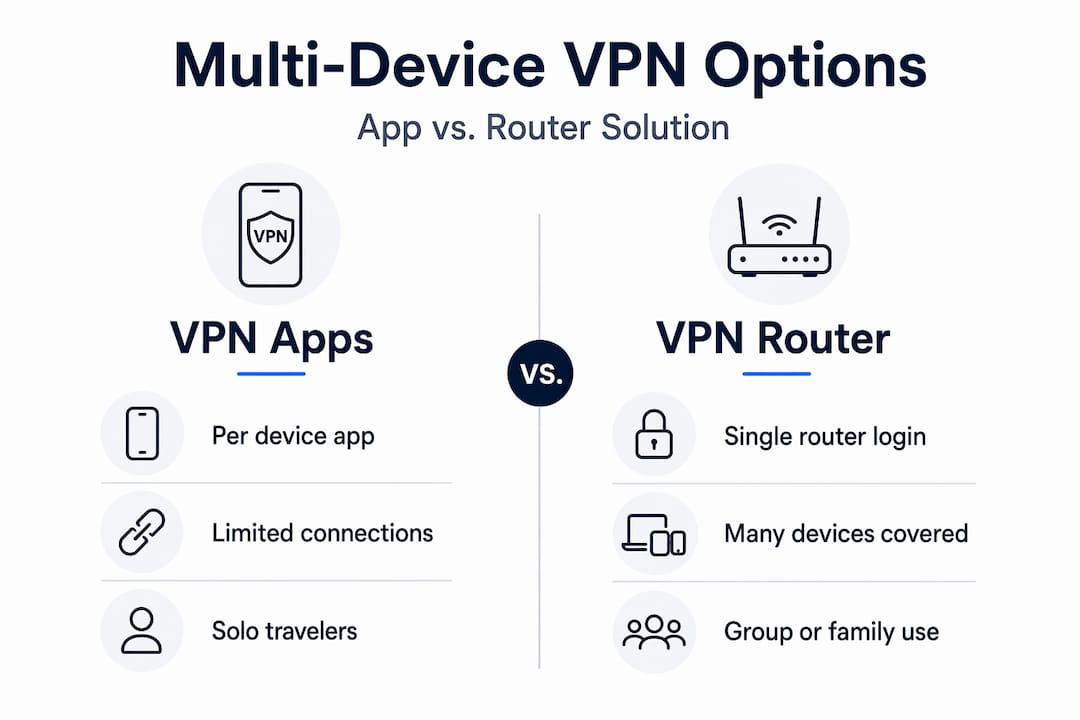
The individual app approach works fine if you carry two or three devices and travel solo. The moment you add a fourth device or share an account, you are one connection away from leaving something unprotected.
Multiple VPN accounts solve the slot problem but create a management headache. You are paying for two or more subscriptions, tracking separate logins, and hoping your provider’s pricing makes that viable long-term.
The travel router approach is the most scalable. A router counts as a single connection protecting all connected devices, which is ideal for travelers with many devices. Pair it with one or two individual device apps for when you are away from the router, and you have covered every realistic scenario.
Some travelers also explore sub-account options offered by certain providers, which allow family or team members to share a plan with separate credentials. This reduces the risk of one person’s device activity bumping another person off the VPN.
My honest take on traveling with VPNs across devices
I have spent years testing VPN setups across dozens of countries, and the single biggest mistake I see travelers make is assuming their VPN subscription works like a streaming service. It does not. You cannot just hand your login to a travel partner and expect six devices to stay protected simultaneously without a plan.
The second mistake is ignoring non-traditional devices. I once watched a colleague spend two weeks in Southeast Asia with his smart TV completely unprotected because he assumed the hotel network was safe. It was not. A travel router would have fixed that in ten minutes.
My honest recommendation: invest in a quality travel router before your next long trip. The high-performance dual WAN and cellular failover features on newer routers have genuinely transformed how I travel. I set it up once in my hotel room, and every device I own gets protected for the rest of the stay without touching a single VPN app.
The cost argument against routers falls apart quickly. A decent travel router runs $80 to $150 and lasts years. The peace of mind, especially when you are working remotely and handling sensitive client data on unfamiliar networks, is worth far more than that.
What I have learned is that the best VPN setup for travel is not the most expensive one. It is the one you actually use consistently, on every device, every time you connect to a network you do not control.
— Deep
How Privacytoolslab helps you find the right setup
Figuring out which VPN provider handles multi-device travel best, and which travel router pairs with it cleanly, takes more research than most travelers have time for. That is exactly what Privacytoolslab is built to solve.

The team at Privacytoolslab has put together detailed, tested guides specifically for travelers and digital nomads. Whether you need to know which providers offer the best travel VPN benefits for multi-device setups, or you want a breakdown of how to bypass geo-restrictions safely while abroad, the guides are built around real use cases. You will find transparent comparisons, honest assessments of device limit policies, and router-compatible provider recommendations that cut through the marketing noise. No generic advice, just what actually works when you are working remotely from a hotel in Chiang Mai or a co-working space in Medellín.
FAQ
How many devices can one VPN account protect while traveling?
Most VPN providers allow between five and ten simultaneous connections per account. NordVPN caps accounts at six devices, though using a VPN-enabled travel router counts as just one of those slots regardless of how many devices connect through it.
Does a VPN router really count as one device?
Yes. A router counts as a single VPN connection, protecting all devices connected to it. This means you can cover a laptop, phone, tablet, smart TV, and gaming console while only using one slot on your VPN account.
What devices can’t run a VPN app and need a router instead?
Smart TVs, gaming consoles, streaming sticks, and most IoT devices cannot install VPN apps natively. VPN-enabled routers protect these devices by encrypting their traffic at the network level without requiring any software installation on the device itself.
Is it worth buying a travel router just for VPN use?
For anyone carrying more than three devices or traveling with a companion on a shared VPN account, a travel router pays for itself quickly. It eliminates connection slot conflicts, protects devices that cannot run VPN apps, and simplifies your entire security setup to a single configuration.
Can I use a VPN on public Wi-Fi across multiple devices safely?
Yes, and you should. VPNs use 256-bit AES encryption to secure data on untrusted public networks. The key is making sure every device connects through the VPN, either via a native app or through a VPN-configured travel router, before accessing any public Wi-Fi network.
Recommended
- Best VPN for Traveling: Ultimate 2026 International Protection – PrivacyToolsLab
- Best VPN For Travel — Complete Guide 2026 – PrivacyToolsLab
- Best VPN For Remote Work — Complete Guide 2026 – PrivacyToolsLab
- VPN for Bypassing Geo-Restrictions Safely: 2026 Guide – PrivacyToolsLab
Article generated by BabyLoveGrowth
🔒 Our #1 Recommended VPN
NordVPN — Military-grade encryption, 6000+ servers, no-logs policy.
⭐⭐⭐⭐⭐ Trusted by 14 million+ users. 30-day money-back guarantee.
✅ 30-day money-back guarantee
🛡️ Fast & Secure VPN
IPVanish — 2,400+ servers in 90+ locations. Connect unlimited devices simultaneously.
⭐⭐⭐⭐⭐ Zero-logs policy. 30-day money-back guarantee.
✅ 30-day money-back guarantee
🧊 Privacy-First VPN
IcePrivacy VPN — Premium privacy protection, strict no-logs policy, fast global servers.
⭐⭐⭐⭐⭐ Built for users who take privacy seriously. 30-day guarantee.
✅ 30-day money-back guarantee